
Forum Replies Created
-
AuthorPosts
-
 adminKeymaster
Hi, one russian friend made windows95 installation tutorial on youtube. Hope it helps. I did not tried that yet, but I use windows made by this tutorial and works great.
here are drivers :
Collection of drivers for Windows 95-98
– video driver S3Trio64
– Sound Card Driver Sound Blaster 16(sb16)
– video codec indeo5
– directx 8.0 rus
– dcom95
– virtual clone cdhttp://www.mediafire.com/download/jijk875lfjw6ti7/Drivers_for_Windows+95-98.zip
directx 8.0 is russian, maybe someone can give here link for english version
Maybe other people can share here experiences.
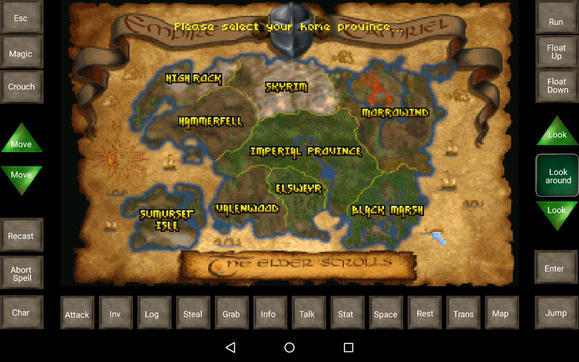
adminKeymasterHi, I added bryan’s layout but modified for bethesda version which can be downloaded on their website for free.
Also I added screenshot from bryan’s layout. Nice isn’t?:)
Download
http://www.mediafire.com/download/tfkdz0r1z4u1au5/Daggerfall_byBryan.mgcHint
In advanced settings you can setup manual resolution for mouse to 320×200. This increases absolute mouse accuracy. But during installation absolute mouse does not work and this options must be disabledadminKeymasterHi,
if you use expert settings then try set
aspect=true under [render]
I will add this parameter to GUI in next version
Tony
adminKeymasterI send you email with more instructions. Probably I will make guide for win9x games.
adminKeymasterfixed
adminKeymasterAuthor : Bruenor
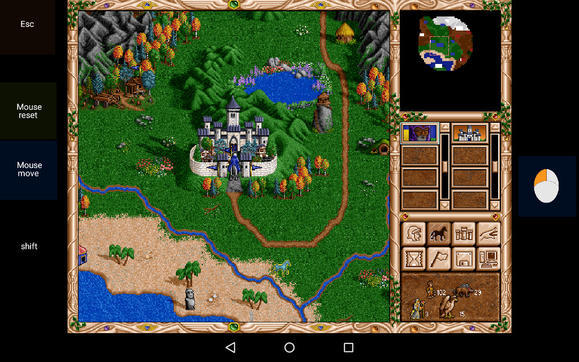
Originally made for Nvidia shield Tablet with resolution 1920×1080– game uses fixed absolute mouse, but it requires mouse reset around each seven game days
– layout has added swipes ability for screen scrolling
– enabled longpress with right mouse for checking army or various statuses
– in battle use “mouse move” button for correct mouse cursor position(see youtube video).screenshot
youtube
Download for NO CD version
http://www.mediafire.com/download/onr7sxuzoo0p2n6/Heroes_2.mgcDownload for GoG gold edition
http://www.mediafire.com/download/afeu8g8asu33kul/Heroes_2_Gold.mgcadminKeymasterCheck email;)
adminKeymasterHello:)
I will be happy to help you:) What game you are trying? I can make video presentation.
For now :
You must place 4 “Target” widgets on the screen. Each for every scroll direction. Go to “Target” settings (double tap on widget in design mode) and set every target to borders in which mouse starts scrolling the screen.
here is dune 2 example:
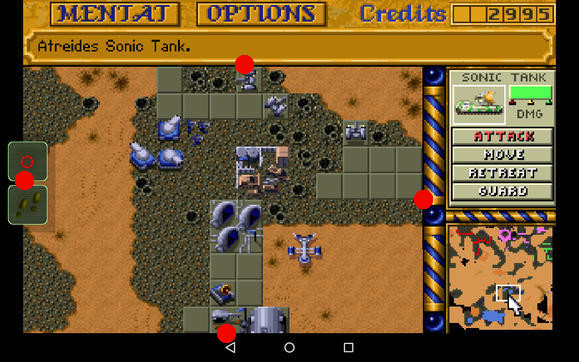
Then go to “general settings->mouse and gestures” and scroll down to swipes. Map target widgets to correct swipes directions. After you map swipes directions then you will be able set additional swipe settings.
Today I uploaded KKND and Dune 2 profile to mgc file sharing section. You can check settings how I did it.
adminKeymasterHello, here is clean KKND layout.
– It has fixed absolute mouse for better correction
– added swipes for screen scrollingDownload
http://www.mediafire.com/download/bqiziclt6i5eg0o/KKND.mgcadminKeymasterI am sorry I made decision that this feature will be not implemented. I like to implement what people need, but this feature is very hard and I will not bring effect you need. Mouse reset means not only to set one variable to true or set some values. Mouse reset means that I must change mouse for a moment to relative and move it manually to negative coordinates x,y[-2048, -2048]. Then I set it to middle of the screen. This is average task – not easy nor hard, but doing it frequently on finger UP is not good idea. I can’t imagine it well…This will lead to problems like :
-you will be not able click, because mouse can be in synchro event (synchro needs takes some time to be completed)
or
-screen can start scrolling when you don’t need itBut main problem is that all gestures must react well on that. Its hard for implementation.
I am sorry, but not now…maybe I will get idea how to fix it in the future. But the game is made for relative mouse – like Albion. Authors did it.
adminKeymasterChris is skilled:) Can I share it in mgc section?
EDIT : Sorry this is mgc sections ;D I was sleeping probably 🙂
adminKeymasterThank you updated. Ultima Underworld 2 is still marked as unusable with absolute mouse because it desynchronize too fast.
adminKeymasterWell I will improve right button next to “Main program”. Currently it copies “autoexec” generated from GUI to clipboard. I can improve it and can generate whole dosbox config. I will put there question dialog, so you will be able choose what generate :
1.only autoxec
2. whole configalso I can add aspect=true/false to GUI to next update
adminKeymasterHi, I cant give quick answer. I know what you mean. I tried to fix drag issue many times, but for some games is not possible. I will think about this and will write answer later. Its not easy for quick answer.
I had dragging troubles in fallout too and I implemented one feature to Touch Widget – ignore next mouse up.
I did not used it for a long time and maybe its broken, because I rewrote a lot of code since I used it, but maybe it can help.
Idea is : hold touch widget and click on item to move, then on place where you want drop it.
adminKeymasteri like your dragon icon 🙂
-
AuthorPosts

