
Forum Replies Created
-
AuthorPosts
-
 adminKeymaster
He owns nvidia shield tablet, so it will run (not perfectly, but will). Trouble is that diablo 2 takes more than 2GB after installation… To solve that I deleted some files…;D ;D It’s not crashing…:D But probably will later in the game;)
Maybe vanilla diablo 2, or ripped version will be better solution.
adminKeymasterHello,
Thank you very much, I really appreciate it. I don’t see any bigger troubles with this implementation, so I will try add that to next version (but can’t promise it at 100%). But remember, initial setup must be done on touchscreen. Currently you can’t setup widgets only with gamepad. This is still sound of future.
Best regards,
TonyadminKeymasterHello,
yeah, there is a lot of things in the list what I want implement, but I am very happy for every suggestion. I can’t promise it will be immediately implemented, but if it makes sense then I will work on that.
So if I understand well you need functionality what allows you to bind “Target” and “Deadly strike” widgets to physical gamepad, right?
Best regards,
TonyadminKeymasterHi,
In game profile set sound blaster 16. In game folder is setup.exe. Start it.I used autodetect for sound and here are correct values
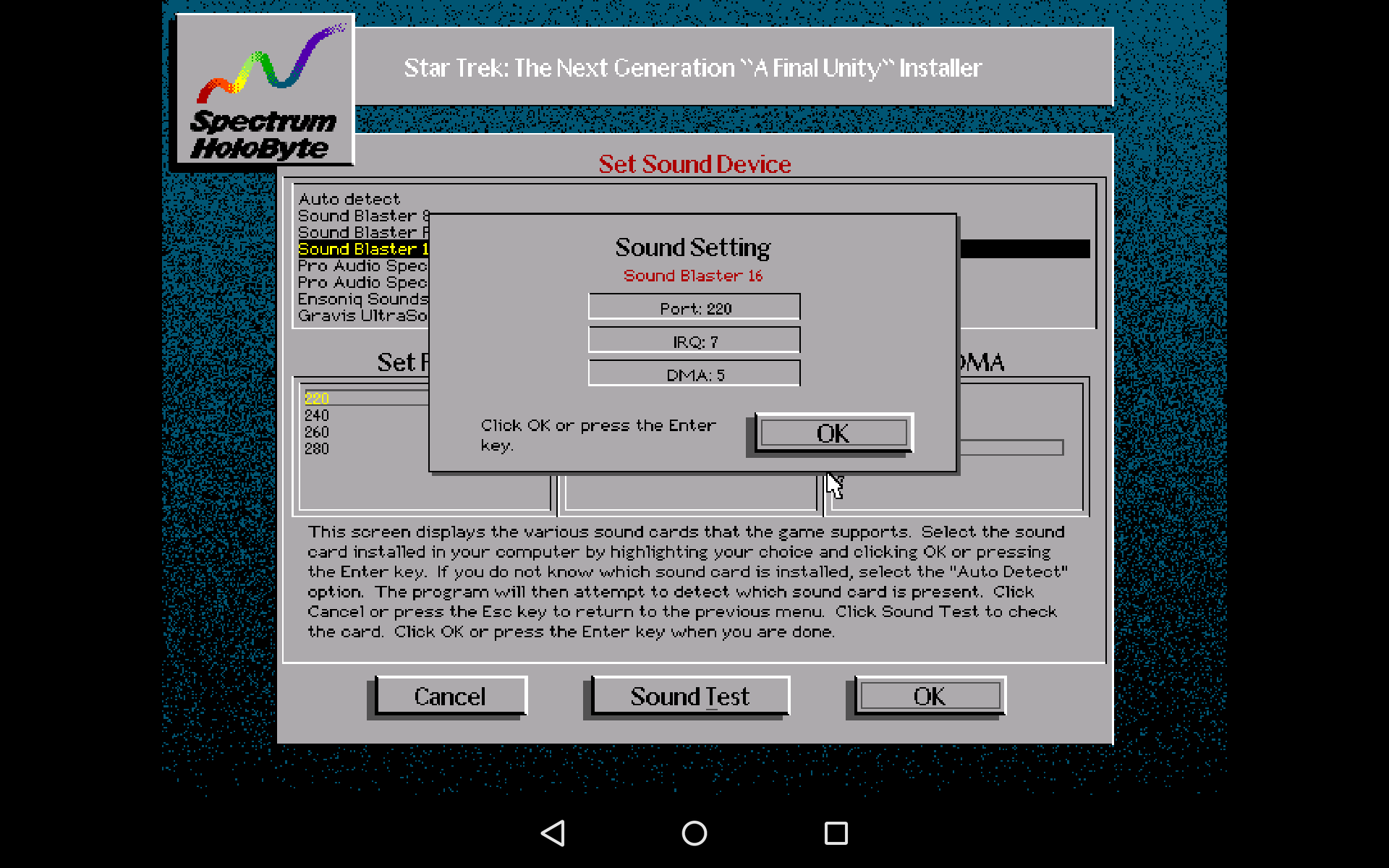
If you need extra performance then in game profile set sound blaster 2. Here is result of autodetect.
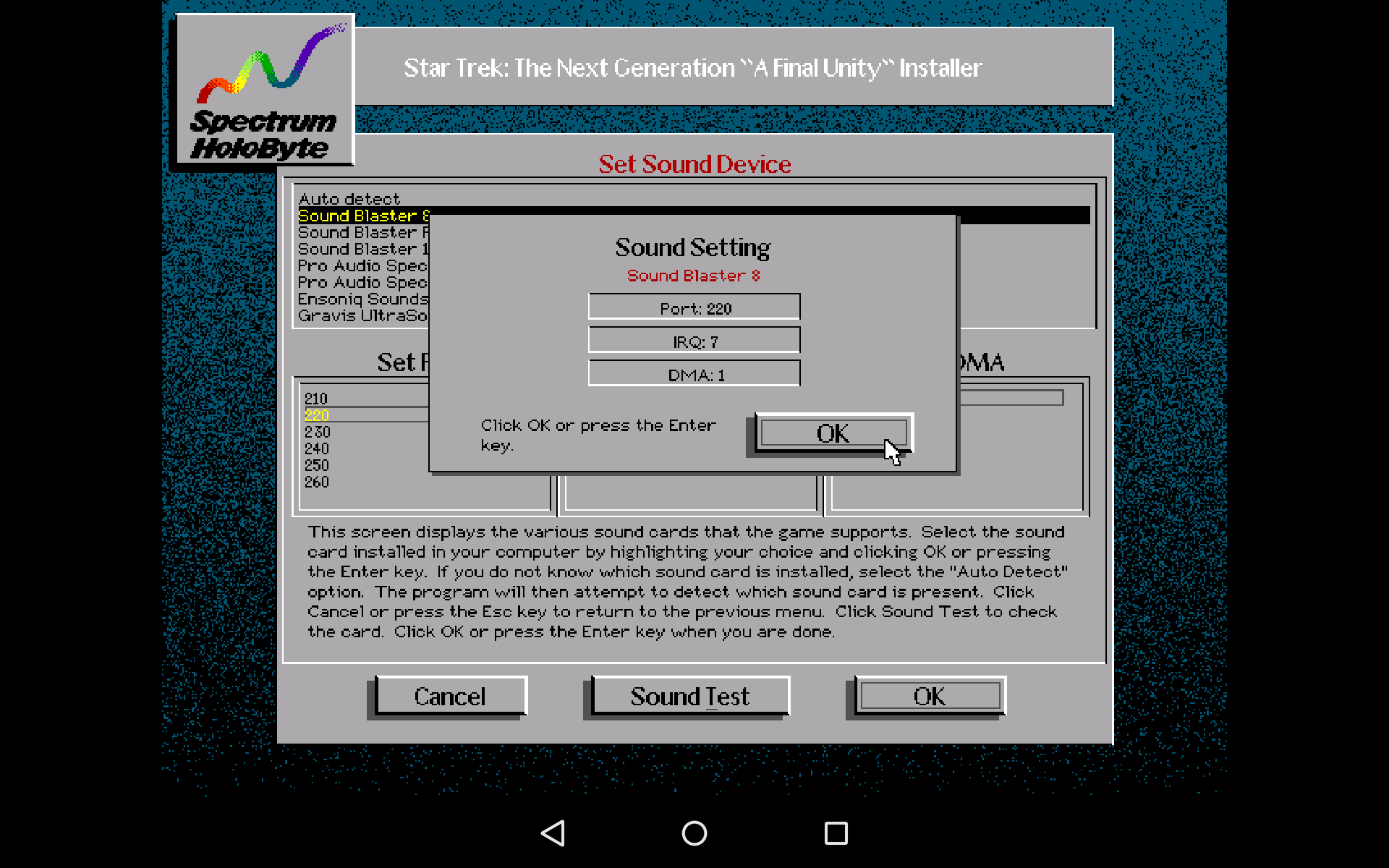
Best regards,
TonyadminKeymasterAmazing! I am just playing it with beta version and your layout. This layout is masterpiece! Fantastic! Thank you
adminKeymasterHi there,
thanks for suggestion. You are right, this feature is missing. Hope I can get soon to implementation. I am still working on other features. Many times helps if you copy content of all floppies to one directory and install it from there.
Best regards,
TonyadminKeymasterHi John,
thank you very much for report. I’ll look at this today and let you know.
Best regards,
TonyEDIT : Ah you are right. 8way dpad is broken. I am going fix that…
EDIT : Well, it’s fixed. Virtual dpad was pretty well rewritten in last months and this bug was caused during these updates. I am sorry for problems and thank you for report…Can you live for a while with this bug?
adminKeymasterthis solution :
“First finger holds widget. This activates system to zooming mode. With another two fingers you can freely zoom any part of the screen.”
This is implementable almost fine.
I know what you want, you want something like working with photos. With two fingers you do zoom in/zoom out. But there are none other complicated actions like longpress, double tap, two point tap and all widget collision types. mDosbox has really complicated control system of widgets and gestures. They all interact together and adding two point zooming will be nightmare. But…I will know more when I start working on that. And at the end…maybe we can recycle “two – point gesture” and instead mouse action it can do zooming. I must think about it. It’s really hard task.
Best regards,
TonyadminKeymasterHi Eddie,
oh, last post was before 4 months …? The time flows…Unbelievable. Unfortunately no. Good is that I meanwhile I implemented and fixed major problems like
– many devices have broken keyboards and could not send keys to mDosbox. This was solved with inbuilt keyboard
– many people use external gamepad, but there were many issues what prevent correct working.
– virtual joystick didn’t work correctly for fps gamesAll was fixed. Last 10 days I refactored whole wrapper side because it limited me in further development. This all is now fixed and I can continue with new features. I still have trouble that many people who don’t like current icons and titles. Refactored source codes allows me now something like simple “theming”.
Eddie, I am not sure if I can implement zooming with two fingers. It can clash with other gestures, but I can find another way. May I have some questions?
what do you exactly expect from zooming? You want increase some part of screen and continue your game like before zooming? Only the game will be zoomed?
As I wrote before, two finger will probably clash with widgets + gestures system. But what about this solution :
I can create new widget. Maybe it can be called “Eagle eye” for phantasy theme and “Zooming” for standard theme (will be released in one of next versions). If first finger holds “Eagle eye” widget and second taps somewhere on the screen. The second finger points to area what will be zoomed.
Or maybe better solution. First finger holds “Eagle eye” widget. While holding this widget system will omit gestures and you can do zoom in/out with another two fingers.
what do you think?
adminKeymasterIt works with spen, but it requires training;) Don’t touch the screen, but do it “on the fly” 🙂 Alex, you have rooted device, can’t this be removed?
adminKeymasterAre you doing it with finger or spen?
adminKeymasterI tried this game on my Sony SP. Gestures except long press send right button correctly. Mouse touch widget works correctly too. I am not sure why longpress has trouble with right button in this game. I must check it, but I am now in deep source code refactor. I can check it later.
Can you please write what way you picked for doing right click? Gestures or mouse touch widget.
Tony
adminKeymasterI am on first screen at the bay with seagull.
You are right. Just tested, it works except longpress (But I am testing it with beta version). Two point and double tap works. Maybe game need specific timing, because I quickly tested warcraft 2 with longpress and works fine. I’ll look at this.
For now I recommend Mouse touch widget (in this case disable all gestures for faster reactions) :
Place “Mouse touch” widget on the screen. Holds first finger on mouse touch widget and tap with second finger on seagull. Now you should see :
“Ever the scavenger, the sea….”
Or use gestures except longpress.
Best regards,
TonyadminKeymasterI think, I must create additional video guide 😉
adminKeymasterHi,
You have two ways how you can control mouse on touchscreen. Based on quick review seems that Heart of China supports both way.
1. Relative mouse – this type is set by default, because every game supports it. Relative mouse emulates standard physical mouse. Use gestures (longpress, two point tap, double tap) for getting work right click or dragging. Or you can place “Mouse touch” widget on the screen and use this. Depends on you.
2. Absolute mouse – moves mouse cursor to place where you touched the screen. Use mouse touch widget or gestures for getting work right click.
For adventures and for “pixel hunting” I think is better relative mouse, but depends on you. You can quickly switch between relative and absolute mouse with “Mouse navigation” widget.
Best regards,
Tony -
AuthorPosts