Forum Replies Created
-
AuthorPosts
-
 adminKeymaster
Hi,
here is video tutorial
But it’s made for standard android devices. You said, you don’t have back button. I use back button for showing “General settings” from where you can edit your game layout.
This process will be simplified in next version, but still needs back button, because it calls menu options.
Has your smart watch any special buttons? Maybe I can re-bind “back button” to something else.
Edit : Another option is made key layout on standard device and then import it on watch. The buttons are saved in percentage values, so buttons proportions will be scaled. Well, there may be problem with another screen aspect ratio, but with some effort it could be done.
Best regards,
TonyadminKeymasterHello,
uh:) Your post surprised me. I never though that someone may want play these old games on smart watches, because the display is really small:) What games did you try and how they work on this device? Really interesting.
But back to your question. I never tried smart watches, is there any way how to popup virtual keyboard? Or is there back button? Maybe you can try add virtual buttons – “Key widget” on the screen.
Best regards,
TonyEdit : I am going download google wear emulator for test
adminKeymasterHello, I didn’t dig deeper, but I found this :
http://www.dosbox.com/wiki/Connectivity
” In Linux specifically, only root (or superuser) can use port numbers lower than 1024.”
adminKeymasterBtw, you can still duplicate the game profile, so you can have different controls.
adminKeymasterHi, thank you very much. Yes, you are right, this is good idea. The mapper structures are able support multi profiles, only user interface is nor prepared. I’ll do a lot of work next year on user interface, so I can fix this too.
Best regards,
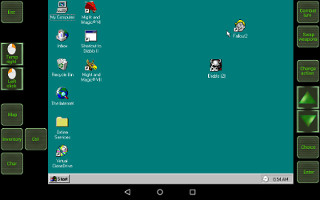
TonyadminKeymasterFallout 2
This game starts under win95. It was originally made for : Nvidia Shield tablet.
The layout is the same like for Fallout 1, but modified for starting win95 image first.


Download
http://www.mediafire.com/download/buzvsgz0odapg6o/Fallout_2_byBruenor.mgcadminKeymasterHi,
thanks for warning. I want release soon version 34 (around 10th or 11th). And rest of this year I want optimize website. So any idea or suggestion is welcomed.
Thank you,
TonyadminKeymasterHi, I really don’t know. But daggerfall can’t detect cd if you didn’t fill cd label correctly. In youtube section is how to install daggerfall correctly. Also this video contains how to set CD.
adminKeymasterHello,
thanks for question. There are no dumb questions. Hmmm, you can export game and import it again, or you can duplicate game profile. These new profiles you can modify. But you probably want import only part of layout from one game to another (maybe specific widgets).
Unfortunately this is not yet done. This feature is long time on to-do list, but there is no user interface currently. I am sorry. I’ll work on that, but this is not what can help you just now.
There is one bad way – manually. You can copy file layout.xml from one game to another and edit it. But be careful and check starting and enclosing xml tags.
But I like if you can write how you expect this functionality will work.
Tony
adminKeymasterThanks:)
adminKeymasterThank you;)
adminKeymasterApologize my bad english…I don’t understand this line
“I also find that it does not honor my bag locations, moving them to upper left when closing, then reopening.”
adminKeymasterThe widgets inside bag cannot be resized. But you can resize text and icon inside every widget. Currently bag supports two types
1. auto-aligned
2. customIn first type is bag resized automatically up to maximum possible size (at beginning is calculated max count of visible widgets). Second type allows to define rows and columns. But again it’s limited with the screen size.
I want make two improvements.
1. Second type (“custom”) will gain scrollbar and you will be able set more rows and columns then now.
2. I’ll add third bag type where you will be able freely resize widgets and set custom position
*I sent you email about the serial support.
adminKeymasterHah, this post is one year old and I still didn’t add the manager for custom images. And the to-do list is still so full…
Btw, I sent you email about the serial port.
adminKeymasterHi,
Thank you for support and suggestion. Truly this idea is good and I wanted to implement that in September, but I was busy with other things. Soon will go out version 33 and for version 34 I have exact plans, but maybe if things will go fast and without problems then I will look at this. Else in version 35…This feature can really skip annoying into or so.
Best regards,
Tony -
AuthorPosts


