
Forum Replies Created
-
AuthorPosts
-
 adminKeymaster
Hi,
mgc file is exported game layout. Donated (full) version contains “import” functionality in main menu.
Best regards,
TonyadminKeymasterAnother question is how to defend mDosbox settings? I am not sure whether spamming at each startup is good solution. I can start storing settings back to /Android/data. Settings will be safe for a while, but everything will be lost during uninstallation. This is bad. But maybe I can really decrease the timeout from 7 days to 1 day.
adminKeymasterAnother reason may be problem with sdcard, but this is little chance. Disappeared any other files/folder from time to time?
adminKeymasterReported cleaner app was “System cleaner”
It’s possible find many discussions about missing folder after cleaning process like here
I tried contact developers with question how can I defend mDosbox, but without luck. Who knows who is behind this app, they have contact form and I never received response.
Please do you use this app? or similar
adminKeymasterDamn, this charges me more and more. Kalistan, please can you describe what you did before it vanished? please check whether the MagicBox folder is really empty – without “Data” folder. This folder is created with first added game. Or check how many hashed folders are inside.
I know two reasons when it happens
1. If you uninstall application – I never experienced this, but it happen to one guy. I have no details, but he probably he uninstalled app through google play. And seems google play or android cleaned MagicBox folder
2. System cleaner app – this is really serious problem. I tried contact developers of this app (will check name of this app in emails history). This app simply removes MagicBox folder.
Android recommends store applications settings/data or whatever inside special folder located /storage/Android/Data/…
But whatever I saved here is removed during app uninstallation, or after some time. This is reason why MagicBox folder is outside and stored in root of main storage or sdcard.
But damn, seems android and cleaner applications lead aggressive war against this workaround.
Exactly because of this was added backup system in last version. You can create full backup of your settings and send them to dropbox. You are prompted to do so after 7 days of last change. But this is too late seems…
Ah, damn, how to beat it?
adminKeymasterPlease what you mean with “works great for every other program except dosbox”. What does another program, but does not mDosbox?
I succeed with disabling the black cursor on nvidia wireless controller controlled with right joystick. With physical mouse I was not successful, seems this is android limitation and depends on manufacturer. I don’t own external touchpad so I can’t test it now. But if touchpad simulates touchscreen then probably it cant’t be hidden. As I wrote I succeed hide black cursor controlled with gamepad. It’s because you can tell system that mouse event was handled and processed. But this is happening for touchscreen the same way and cursor wont hide;(
adminKeymasterHello there,
Thank you very much. Absolute mouse was discussed many times. You are right, Albion can’t be played with absolute mouse, but you are wrong with realms of Arkania. All three parts are perfectly playable with absolute mouse. See. All MS-DOS games were made for relative mouse and that Absolute mouse works for many of them is hack. In MS-DOS were no standards kept by games. To get absolute mouse fully functional you need to know exact position of cursor and must move it to exact coordinates. MS-DOS games managed cursor many times at their own and unfortunately often didn’t report these changes to DOS. In this case there is nothing what I can do with absolute mouse. To get it work game must be ported.
Please see this list
I am not sure with afterlife, I didn’t play this game.
[EDIT] Seems afterlife works fine with 640 x 240
Best regards,
TonyadminKeymasterThank you for wiki, I understand now. Will contact you in next month after I add these features.
adminKeymasterGreat;) Of course if you want I can add you to group of testers, you can test these features before official release. Well, I’ll work on that at beginning of May.
Please can you write example for invert, only for sure:)
adminKeymasterhi,
please, do you need the patch for deadly strike to upcoming version or it can wait for v38?
You mean swap X and Y mouse coordinate?
Tony
adminKeymasterHello,
Thanks for question. Unfortunately this is not possible now. Deadly strike does not support this action. I closed version 37 and is in test phase, but if is necessary I can add this feature. This patch will be not so hard. Only release date will be a bit delayed.
Please let me know
Tony
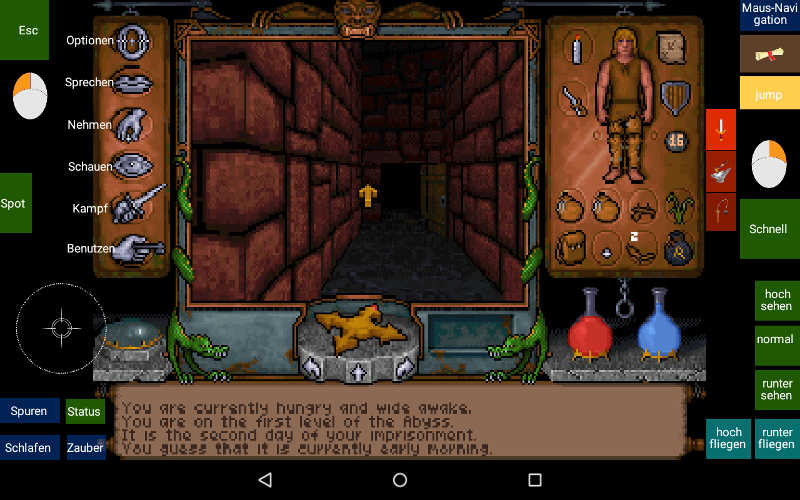
adminKeymasterUltima Underworld I:
Some information:
Tablet: Telekom Puls, 1280 x 800
Aspect ratio = on
This one is in german language.
The game interface is designed to play with the mouse. Playing with my PC it is very comfortable. But with a tablet or phone it becomes very exhausting after some time.
The good news is: The game is playable with mouse OR keyboard.Moving:
Using mouse you have to place the cursor in the main area (right hand). You are able to move with “Mouse left” (left hand). Check manual for more information.
I am using the joystick to move around. It is in 8-way mode but only 6 directions are in use.
“Schnell” speeds up, “Jump” jumps.Fighting:
If you want use the mouse, but I suggest to use the three red keys on the right. You still have to aim with the mouse in the main window if you are using long range weapons or spells.Looking around:
Simple turn your character to the direction you request. “hoch sehen” = looks to the ceiling, “runter sehen” looks to the floor an “normal” turns back to standard view.Flying:
To fly touch the two blue keys in at the bottom right. (I never used them but maybe next time I play the game.)The “Maus-Navigation” in the upper right toggles between absolute and relative mouse.
Ultima Underworld runs pretty good with absolute mouse. But sometimes my finger is to fat to manage inventory.Spot:
Move cursor very fast from the left to the middle of the main window and to the right.
Double click moves the curser counter clockwise.Very seldom you will need a keyboard. Since the last Magic Box Update you can add the new one, which is really good.
Or use “back” instead to open the standard keyboard.Heinz
 adminKeymaster
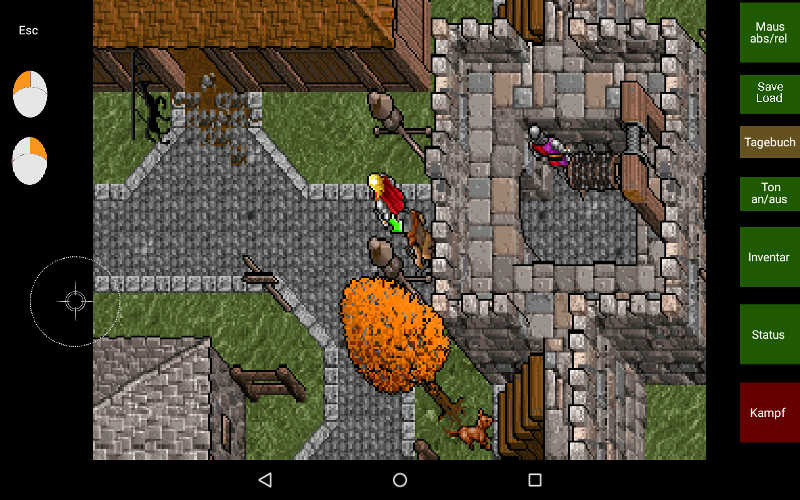
Ultima VII Part I: The Black Gate + The Forge of Virtue
This is an alternative draft to the one from Alex.
Tablet: Telekom Puls, 1280 x 800
Aspect ratio = on
The key are with German inscription.To Move around I use the Master of Puppets. But mouse can be used as well.
Double click inside main area will force the avatar to move to this point“Maus abs/rel” toggles between absolute and relative mouse due to my fat finger in managing the inventory.
Heinz
 adminKeymaster
Hello,
No, Magic dosbox does not inherit from Daum build. It’s based on official version 0.74. Uses cpu core from daum build and some patches what were included to Daum build as well to Magic Dosbox. Then there are various differences due port to android. For example android 5 has special access to sdcard. Magic dosbox must ask to android for permissions objects on the fly, these can’t be saved. Then there is another side – compatibility with previous version. Almost any change to dosbox core breaks save states compatibility and your old save states become incompatible with updated sources. From beginning there is implemented save/load states, but this option is invisible to users, because many times produces broken save states. Will be nice to have this feature and I want return back to it’s development, but not now…
Best regards,
TonyadminKeymasterHello,
Thank you very much for great post. Unfortunately (based on vogons) seems dosbox does not support share.exe too:(
Connecting with client works, but using share.exe for server is probably problem. For client I tested Telemate, telix and mTcp, but this does not help you:(
I exactly know why you love these games. I played many years game Brutus MUD based on Circle MUD. Based on your post I tried connect to server and it works fine with serial1=modem enabled. These old text games still offer something magical.
Best regards,
Tony -
AuthorPosts