- This topic has 43 replies, 3 voices, and was last updated 9 years, 3 months ago by
 admin.
-
AuthorPosts
-
21. June 2017 at 16:22 #4625
JemyM
ParticipantI tested the new system and managed to create the EoB interface like the mockup. I even have a party order selector that uses the same system. The weird Syndicate resolution is still causing issues though. 🙂
 21. June 2017 at 16:51 #4626
 Al exKeymaster
That looks really ingenious. ?
Syndicate is weird. They’re obviously using the whole screen, but displaying the game and mapping the mouse only onto parts of it, hence the black borders on top and bottom. Now, Dosbox doesn’t know better, of course, and wants to use the whole screen. That’s why it always goes off target, because no matter what I use for manual mouse correction, it always calculates from the top left corner.
21. June 2017 at 16:54 #4627Al exKeymasterWhich means, if we could change the relative position of the absolute mouse reference point, this could be fixed.
21. June 2017 at 20:06 #4630 adminKeymaster
Cool 🙂
21. June 2017 at 20:47 #4631Al exKeymasterCool layout? Or “cool, now I know how to fix the mouse in Syndicate”? ?
21. June 2017 at 20:51 #4632adminKeymasterCool layout 🙂 Btw, Alex, can you try again get to beta versions on google play? Another one guy successfully uses this system, I release several betas in last days. I now go release another beta with one fix
btw2, I got one idea how to reduce backgrounds. If in your layout is fixed UI then you can add background to “Background image” – setup is in advanced settings.
23. June 2017 at 14:07 #4635ParticipantEye of the Beholder works brilliantly with the stream widgets. I might share my .msc once its official.
Syndicate have two issues. Reported both but repeating here as a note. First the mouse that cant be clicked in the top of the screen. Even if you click a stream the area. Second is that the minimum size of the streamed area is larger than one of the “powerbars”.
23. June 2017 at 15:06 #4636adminKeymasterUhm, I though I fixed that minimum size, I must check it again, I just released new version
Edit : I quickly checked absolute mouse, seems is broken in vertical direction on bith sides top and bottom, horizontal works. I’ll try find some time in multi-layer support for this
25. June 2017 at 15:34 #4638ParticipantThis is the smallest possible size for the streamed version for me. Note how its almost double the size of the bar.
 26. June 2017 at 10:53 #4641Al exKeymaster
Regarding the mouse thing, check this out. I’ve combined the menu screen and the game screen. You can clearly see how the game screen is using less screen space, leaving black borders at the top and bottom. This causes the absolute mouse being off.
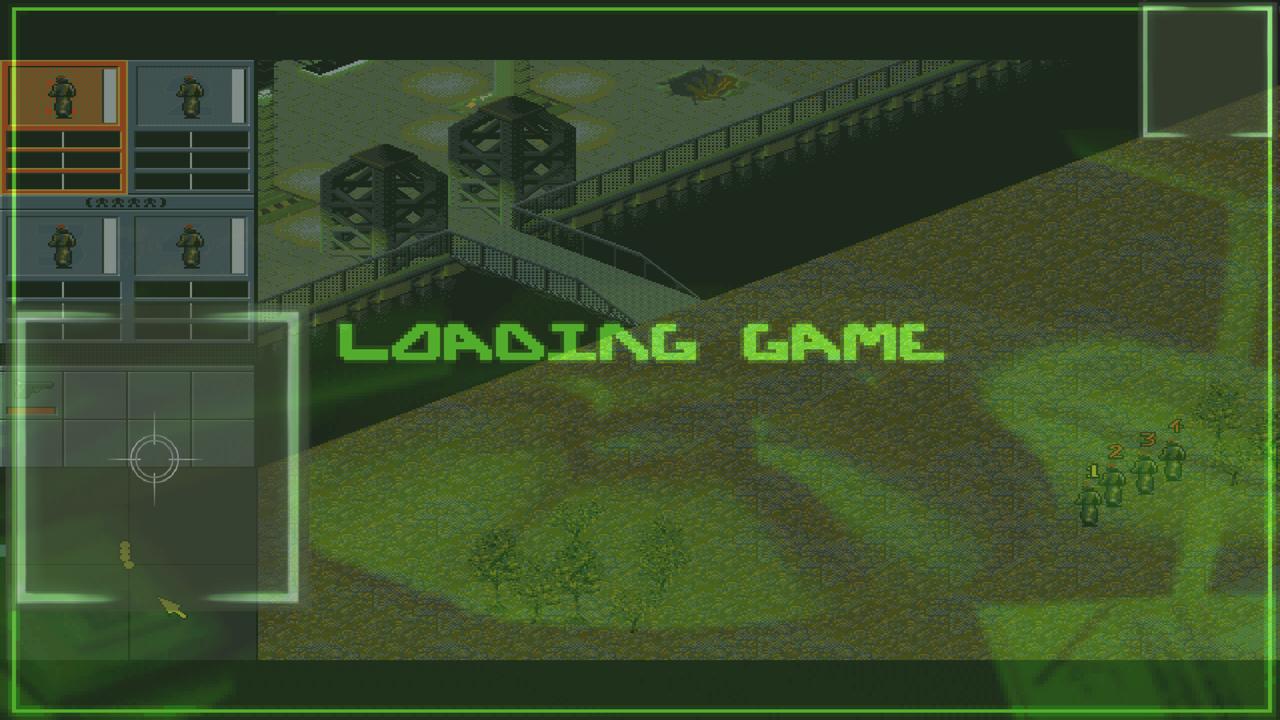
Funnily, the relative mouse is working fine, even though its clicks in the stream window are translated into absolute mouse clicks.
26. June 2017 at 18:35 #4642adminKeymasterSeems like absolute mouse range is scaled, maybe I know where to dig. Can you try it in db turbo or andosbox pls?
26. June 2017 at 18:44 #4643Al exKeymasterWill do that…?
26. June 2017 at 19:06 #4644Al exKeymasterIt’s exactly the same.
26. June 2017 at 19:14 #4645adminKeymasterHmm thanks Alex, it helped, I’ll check it when I finish component for controlling layers. In next days
-
AuthorPosts
- You must be logged in to reply to this topic.