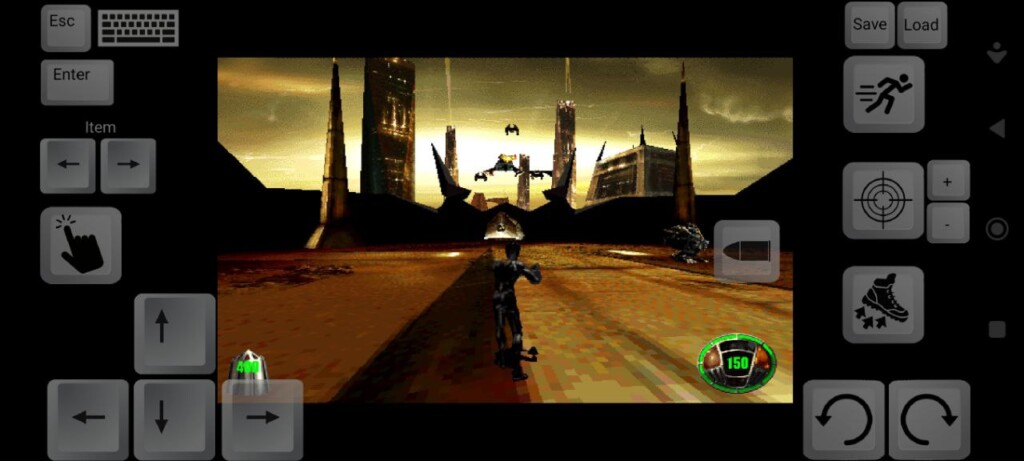
It’s been a while! Would you like to play MDK? I’ve got a control setup ready for all of you.
Controls:
The character movement and strafing are assigned to the arrow keys, while the screen rotation is controlled by swiping your finger across the screen and using the circular arrows. The latter was added for the free‑fall segment before the mission starts.
The “Item” (arrow keys) is used to select the active item. It’s operated with a finger icon.
“Aim” activates the sniper mode. Aiming itself is done by swiping your finger across the screen. The +/− buttons control zoom in/out in sniper mode, as well as looking up/down in free mode.
COOKIES & PRIVACY This website uses cookies to improve your experience. We need these cookies for correct website functionality and for user account management.AcceptRead More
Privacy & Cookies Policy
Privacy Overview
This website uses cookies to improve your experience while you navigate through the website. Out of these cookies, the cookies that are categorized as necessary are stored on your browser as they are essential for the working of basic functionalities of the website. We also use third-party cookies that help us analyze and understand how you use this website. These cookies will be stored in your browser only with your consent. You also have the option to opt-out of these cookies. But opting out of some of these cookies may have an effect on your browsing experience.
Necessary cookies are absolutely essential for the website to function properly. This category only includes cookies that ensures basic functionalities and security features of the website. These cookies do not store any personal information.
Any cookies that may not be particularly necessary for the website to function and is used specifically to collect user personal data via analytics, ads, other embedded contents are termed as non-necessary cookies. It is mandatory to procure user consent prior to running these cookies on your website.
 .
.